
Launching your first website? Choosing the best web hosting for beginners in 2026 is the first real decision that can make or break your online journey.
The wrong hosting can lead to poor speed, frequent downtime, and frustration that slows you down. But the right hosting? It can help you launch confidently—with fast load times, built-in tools, and support that holds your hand every step of the way.
Whether you’re building a personal blog, a portfolio site, or a new online store, this guide will walk you through the top beginner-friendly hosting services. We’ve tested and compared the top hosting for beginners in 2026—based on ease of use, pricing, speed, support, and freebies like a free domain, SSL, backups, and more.
🔥 Join 2M+ Website Owners who trust Hostinger for affordable, fast, and reliable hosting.
Don’t miss the limited-time 85% discount! 👉 Activate Hostinger Offer →
✅ Apply Special Hostinger Coupon Code BLOGGINGJOY for extra discount
Best Web Hosting for New Bloggers 2026
Selecting the best web hosting for beginners in 2026 isn’t always easy — especially with so many options like Hostinger, Bluehost, and SiteGround promising great performance. To simplify your decision, we tested and compared all three. Each host delivers reliable uptime and solid WordPress support, but Hostinger takes the lead thanks to its budget-friendly plans, AI website builder, and simple control panel that’s perfect for first-time users. Bluehost remains a trusted choice for WordPress sites, and SiteGround impresses with excellent speed and security, yet Hostinger’s mix of affordability, ease of use, and performance makes it the best starting point for new website owners in 2026.

Beginner-friendly hosting with fast SSD servers and one-click WordPress.
- Free Domain + Free SSL on most plans
- Optimized for WordPress & LiteSpeed Cache
- Easy-to-use hPanel for non-tech users
- 24/7 live chat support

Recommended by WordPress.org and trusted by millions of site owners.
- Free Domain for the first year
- 1-click WordPress install & auto updates
- Simple dashboard for beginners
- 24/7 expert support via chat & phone

Turbo fast hosting with performance-focused servers for serious bloggers.
- Turbo servers for up to 20x faster speeds
- Free SSL & site migration
- Developer-friendly (PHP versions, SSH, staging)
- Anytime money-back guarantee

Managed cloud hosting for growing blogs, agencies, and WooCommerce stores.
- Choose from DigitalOcean, AWS, Google Cloud & more
- Managed security, backups & updates
- Staging, cloning & team collaboration
- Pay-as-you-go pricing with full control

Eco-friendly hosting powered by renewable energy for conscious creators.
- 300% green energy match
- Free Domain, SSL & nightly backups
- Built-in caching for faster sites
- WordPress & WooCommerce ready

Fast global hosting with great support and transparent renewal pricing.
- Free daily backups & free site transfer
- Global data centers for faster loading
- SSD-only servers & built-in caching
- Transparent renewal pricing

Lesser-known but loved for support quality and stable performance.
- Free Domain & free SSL certificates
- NVMe SSD storage for faster load times
- Free website migration handled by experts
- Excellent support for beginners

Premium managed WordPress hosting with blazing speed and quick support.
- Ultra-fast custom CDN for WordPress
- Free malware removal & security monitoring
- Free site migrations done by WPX team
- Ideal for serious bloggers & businesses

Which Hosting Service Is Used by This Website?
This website is proudly hosted on Hostinger’s Premium Web Hosting Plan.
After testing multiple hosting providers over the years, I chose Hostinger for its speed, uptime reliability, and unbeatable pricing. The Premium Plan offers everything needed for a fast, secure, and scalable WordPress site — including free domain, free SSL, and LiteSpeed servers that improve loading times significantly. Here is the proof of my purchase details, expiration date and everything that you must know.
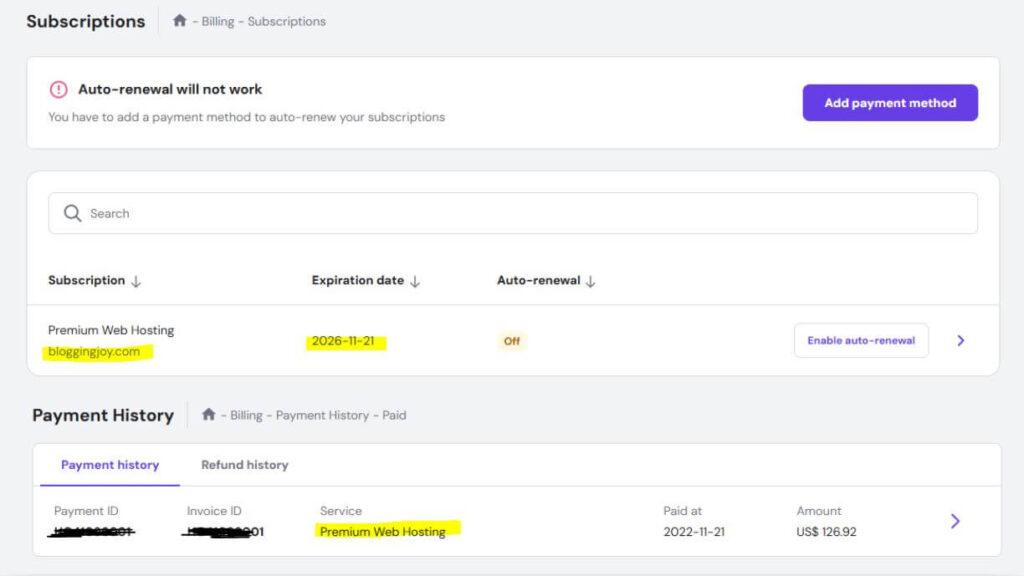
And the best part? You can use the exclusive coupon code BLOGGINGJOY to get an extra discount on top of their already affordable plans. If you’re planning to get AdSense approval or want better RPMs, moving to Hostinger is a smart long-term investment.
🔥 Get Up to 85% OFF on Hostinger Hosting – Limited Time Deal!
Launch your website with blazing-fast hosting at just a fraction of the price. Use Coupon Code: BLOGGINGJOY at checkout for extra savings.
✅ Free Domain | ✅ Free SSL | ✅ 24/7 Support | ✅ WordPress Optimized
👉 Click Here to Grab Hostinger’s 85% Discount Now – Don’t Miss Out!
Table of Contents
Exclusive Hosting Coupons & Discount Deals (2026)
Looking for verified web hosting discounts before choosing your provider?
Below are the latest and most popular hosting coupon pages where you’ll find updated offers, seasonal discounts, and special deals for beginners and businesses in India.
Choose a provider below to unlock the best available price today:
Why Choosing the Right Web Hosting Matters for Beginners in 2026
For first-time website owners, web hosting is more than just storage — it’s the engine that powers your website’s performance, security, and growth. The right hosting provider can help your site load faster, stay online 24/7, and rank higher in Google. The wrong one can slow everything down and frustrate your visitors.
Here’s why your choice of hosting truly matters in 2026:
- Site Speed and Performance: In 2026, website speed directly affects both SEO rankings and user trust. A host with LiteSpeed servers, NVMe SSDs, and CDN integration ensures your pages open within seconds, improving engagement and conversions.
- Website Security and Reliability: Beginners often overlook security. Look for a host that offers free SSL certificates, daily backups, and 99.9% uptime. This protects your data and builds visitor confidence.
- AI-Powered Simplicity: Many modern hosts, like Hostinger, now include AI website builders and auto-setup tools — perfect for beginners who don’t know coding but want a professional-looking site fast.
- Cost-Efficiency with Scalability: A good hosting provider lets you start small and scale easily as your traffic grows. Choosing the right host early saves you money and prevents costly migrations later.
- SEO and Google Ranking Advantage: Google rewards fast, secure, mobile-friendly websites. The right hosting directly boosts your Core Web Vitals and helps you appear more often in AI Overviews and featured results.
- Ease of Use and Support: For beginners, an intuitive dashboard and 24/7 live chat support are game changers. You can fix errors, install WordPress, or restore backups without technical stress.
In short: choosing the right hosting in 2026 is like choosing a strong foundation for your online journey. It determines how fast your site grows, how well it ranks, and how confidently you manage it — even if you’re just getting started.
I’ve tested many hosting providers over the years, and honestly — Hostinger is the one I recommend the most. It’s fast, reliable, beginner-friendly, and now the Black Friday Sale 2025 is live! You can save up to 85%, get a free domain, and launch your website today.
👉 Don’t wait — click this link and grab this limited-time deal before it’s gone!
Shared vs VPS vs Cloud Hosting: Complete Beginner’s Guide
Choosing between Shared, VPS, and Cloud hosting confuses most beginners. This section breaks down each type with real-world examples, traffic limits, and when to upgrade—so you pick the right plan without overpaying or underperforming.
Shared Hosting (Best for 95% of Beginners)
Think apartment building: Everyone shares the gym/pool/elevator, but it’s cheap and works for small families.
| Shared Hosting | Details |
|---|---|
| Price | $1.99-$7/mo (Hostinger/Bluehost) |
| Resources | Shared CPU/RAM/storage with 100+ sites |
| Traffic Limit | 0-50k visitors/month |
| Best For | Blogs, portfolios, small business sites |
| Examples | Hostinger ($2.69), Bluehost ($1.99), ChemiCloud ($2.49) |
✅ Pros:
- Cheapest entry – Perfect $32 Year 1 total (with domain)
- Zero management – Host handles servers/backups/security
- 1-click WordPress – Launch in 5 minutes
- Beginner dashboards – Guided wizards, no tech skills
❌ Cons:
- “Noisy neighbors” – One bad site slows everyone
- Resource caps – Slows at 20k+ visitors or heavy plugins
- Limited control – Can’t install custom software
Start Here If: New blog (<10k visitors), testing ideas, tight budget.
VPS Hosting (Upgrade for Growing Sites)
Think private apartment: Still in the building, but your own walls, kitchen, AC control.
| VPS Hosting | Details |
|---|---|
| Price | $20-$100/mo (Bluehost VPS, A2 Hosting) |
| Resources | Dedicated CPU/RAM slices (1-8 cores, 2-32GB RAM) |
| Traffic Limit | 50k-200k visitors/month |
| Best For | Growing blogs, small WooCommerce, agencies |
| Examples | Bluehost VPS ($29+), DigitalOcean VPS ($6+) |
✅ Pros:
- Guaranteed resources – No sharing slowdowns
- Root access – Install custom apps, tweak PHP/Node
- Better speed/security – Isolated from other sites
- Scalable slices – Add RAM/CPU as needed
❌ Cons:
- Technical knowledge required (SSH, server configs)
- Manual scaling – Upgrade = downtime risk
- Higher cost – 10x shared pricing
Upgrade to VPS When: Shared slows (page times >3s), need custom software, steady 30k+ traffic.
Cloud Hosting (Future-Proof Scalability)
Think luxury condo network: If one building has issues, others cover seamlessly.
| Cloud Hosting | Details |
|---|---|
| Price | $11-$200/mo (Cloudways, Kinsta) |
| Resources | Auto-scales across 100s of servers |
| Traffic Limit | 100k+ visitors (unlimited with budget) |
| Best For | eCommerce spikes, agencies, high-growth |
| Examples | Cloudways ($11), Kinsta ($30), WPX ($20) |
✅ Pros:
- Zero downtime – Traffic surge? Auto-adds servers
- Global CDN built-in – Fast everywhere
- Managed options – No server skills needed (Kinsta/Cloudways)
- Pay-as-you-grow – $11 small → $100 big site
❌ Cons:
- Most expensive – Budget $130+ Year 1
- Overkill for small sites – Waste if <20k traffic
- Complex billing – Watch hourly usage
Upgrade to Cloud When: Traffic spikes (Black Friday sales), 50k+ steady visitors, global audience.
Quick Decision Matrix for Beginners
| Your Situation | Recommended | Why | Cost/Mo |
|---|---|---|---|
| First blog (0-10k visitors) | Shared (Hostinger) | Cheapest, easiest | $2.69 |
| Growing site (10k-50k) | Shared Premium (ChemiCloud) or VPS | More power, still simple | $4-20 |
| WooCommerce store | Shared Online Store (Bluehost) or Cloud (Cloudways) | Handles carts/spikes | $7-11 |
| 50k+ traffic/agency | Cloud (WPX/Kinsta) | Scales automatically | $20-30 |
The Golden Rule: Start Shared, Upgrade Smart
- Months 1-6: Hostinger/Bluehost ($2-4/mo) – Test your idea
- 10k+ visitors: ChemiCloud/WPX ($4-20/mo) – Performance boost
- Spikes/growth: Cloudways/Kinsta ($11-30/mo) – Unlimited scale
Never overbuy – 95% of beginners stay on shared forever. Use 30-day guarantees to test real traffic.
Start with Hostinger Shared – Scale Later – Perfect beginner entry point.
2026 Hosting Trends Beginners Must Know
5 critical shifts every beginner needs to understand before buying hosting. These trends explain why some hosts surge ahead while others fade—choose providers embracing them for future-proof performance.
Trend 1: NVMe SSD Replaces Traditional SSD
| Old Standard | 2026 Reality | Winners |
|---|---|---|
| SATA SSD (Bluehost basic) | NVMe SSD (10x faster reads) | Hostinger, ChemiCloud, WPX |
| Impact: 30-50% faster page loads → Better Google rankings + user retention |
Beginner Action: Skip hosts without “NVMe” in specs. Hostinger = 100GB NVMe standard.
Trend 2: AI Website Builders Kill Manual Setup
| 2000s Way | 2026 Way | Leaders |
|---|---|---|
| Manual WordPress (2+ hours) | AI builds sites in 5 mins | Hostinger AI, Elementor AI |
| Impact: 80% beginners launch Day 1 vs waiting weeks |
Beginner Action: Hostinger AI if WordPress scares you. Answer 3 questions → live blog/store.
Trend 3: Renewal Price Transparency Wins
| Scam Model | 2026 Winner | Real Numbers |
|---|---|---|
| $2→$15/mo (Bluehost) | Low renewal gap | Hostinger: $2.69→$6.99 |
| Impact: 3-year savings = $150+ vs competitors |
Beginner Action: Calculate Year 2 cost before checkout. Hostinger 36-mo = $0.89/mo effective.
Trend 4: Cloud Becomes Beginner-Accessible
| Old Cloud | 2026 Cloud | Game-Changer |
|---|---|---|
| $100+/mo + tech skills | Cloudways $11/mo managed | Real-time billing, 1-click scale |
| Impact: Handle 100k visitors without migrations |
Beginner Action: Start Hostinger → upgrade Cloudways seamlessly. No lock-in.
Trend 5: WordPress-Only Hosts Beat Generalists
| Jack-of-All | 2026 Specialist | Performance Gap |
|---|---|---|
| Shared general hosting | WPX/Kinsta (0.6s loads) | 5x faster than Bluehost |
| Impact: Agencies drop generalists for WP specialists |
Beginner Action: Bluehost/Hostinger for start → WPX when hitting 10k visitors.
Quick 2026 Host Trend Score
| Host | NVMe | AI Builder | Low Renewal | Cloud Ready | WP Optimized | Trend Score |
|---|---|---|---|---|---|---|
| Hostinger | ✅ | ✅ | ✅ | ✅ | ✅ | 5/5 |
| Bluehost | ❌ | ❌ | ❌ | ✅ | ✅ | 2/5 |
| Cloudways | ✅ | ❌ | ✅ | ✅ | ✅ | 4/5 |
| WPX | ✅ | ❌ | ❌ | ❌ | ✅ | 3/5 |
Master Move: Hostinger checks every 2026 trend box at $2.69/mo. Future-proof your site from Day 1.
Lock in Hostinger 90% OFF Before Prices Rise – Trends move fast.
Best Web Hosting for Beginners Compared (2026)
When it comes to beginner-friendly hosting, four names lead the way — Hostinger, Bluehost, SiteGround, and Cloudways. Each one offers solid uptime, strong support, and easy WordPress integration. But their strengths differ depending on your needs, budget, and technical comfort level.
Let’s start with the one that stands out for simplicity and value 👇
1. Hostinger: Best Web Hosting for Beginners 2026
Hostinger takes the #1 spot as the best web hosting for beginners in 2026 because it combines rock-bottom pricing, beginner-friendly tools like AI website builders, and performance that punches above its weight—all without the renewal price shocks or upsells that plague competitors like Bluehost.
Why Hostinger Wins for Beginners
Hostinger isn’t just cheap—it’s smart cheap. You get premium features (NVMe storage, free daily backups, global CDN) that other entry-level hosts charge extra for, making it perfect for first-time bloggers, small business owners, or anyone testing a site on a tight budget.
Performance Stats That Matter:
- Uptime: 99.998% (last 11 months) – Your site stays online when visitors need it.
- Load Speed: 2.014 seconds average – Fast enough for SEO and keeping users happy.
- Money-Back Guarantee: 30 days – Test risk-free.
Key Features Beginners Love
- AI Website Builder – No coding needed. Pick a template, answer questions, and get a live site in minutes. Perfect if WordPress feels overwhelming.
- Free Daily Backups – Automatic snapshots you can restore anytime (unlike Bluehost’s paid add-ons).
- 100GB NVMe SSD Storage – Lightning-fast storage for images, videos, and growth (vs Bluehost’s 40GB limit).
- One-Click WordPress & WooCommerce – Install and launch stores in under 5 minutes.
- Unlimited Bandwidth – Grow traffic without overage fees.
- 7 Global Data Centers – Choose closest server for fastest speeds worldwide.
- Free Domain (1st Year) + SSL – Everything you need to go live Day 1.
hPanel Dashboard – Hostinger’s custom control panel is cleaner than cPanel. Search bar finds tools instantly, guided wizards walk you through setup, and mobile app lets you manage on-the-go.
Hostinger Pricing (Unbeatable Value)
| Plan | Intro Price | Renewal | Sites | Storage | Best For |
|---|---|---|---|---|---|
| Premium | $2.69/mo (90% OFF) | $6.99/mo | 100 | 100GB NVMe | Blogs, portfolios, small stores |
| Business | $3.99/mo | $9.99/mo | 100 | 200GB NVMe + Free CDN | Global audience, growing sites |
Pro Tip: Grab 36-month term for biggest discount. Total Year 1 cost: ~$32 (includes domain).
Pros vs Cons (Honest Breakdown)
✅ Pros:
- Lowest long-term pricing (renewals stay affordable)
- AI tools + free backups = zero extra costs
- Better specs than Bluehost at half the renewal price
- No aggressive upsells at checkout
- 24/7 chat support (average response: 2 minutes)
❌ Cons:
- No phone support (chat/email only, 11 languages)
- 100-site limit (fine for most beginners)
Who Should Choose Hostinger?
- Total beginners wanting AI builder over manual WordPress setup
- Budget bloggers (5k-50k monthly visitors)
- Small WooCommerce stores testing eCommerce
- Multi-site testers (100 sites on one plan)
Real Verdict: Hostinger delivers 90% of Bluehost’s features at 50% of the renewal cost, plus modern extras like AI building and NVMe storage. If you’re starting your first site in 2026, Hostinger gets you live faster, cheaper, and with less hassle.
Get Hostinger 90% OFF + Free Domain – Use 36-month plan for max savings. 30-day guarantee means zero risk.
2. Bluehost: Best for WordPress & WooCommerce Beginners
Bluehost earns #2 spot in Best Web Hosting for Beginners 2026 as the go-to choice for anyone wanting official WordPress.org recommended hosting with one-click WooCommerce stores. It’s perfect for bloggers and small business owners who prioritize ease-of-use over raw specs, delivering reliable performance with bundled eCommerce tools that save hundreds in plugins.
Why Bluehost Wins for WordPress-Focused Beginners
Bluehost isn’t the cheapest or fastest, but it excels at WordPress simplicity—one-click installs, guided setup, and $450+ worth of free WooCommerce plugins on Online Store plans. With unlimited sites on Choice Plus and strong US-based performance, it’s battle-tested for millions of sites since 2003.
Performance Stats You Can Trust:
- Uptime: ~99.9% reliable for small-medium sites
- Load Speed: 3.0 seconds average (solid for shared hosting)
- Money-Back Guarantee: 30 days – Plenty of time to test
Key Features Beginners Rely On
- One-Click WordPress & WooCommerce – Launch full stores (products, cart, payments) in minutes.
- Free Domain (1st Year) + SSL + Cloudflare CDN – Secure, fast sites from Day 1.
- Unlimited Websites (Choice Plus+) – Host blogs, client sites, or portfolios on one plan.
- 24/7 Phone + Chat Support – Human help when chat/email isn’t enough.
- WooCommerce Bundle – $450+ plugins included (checkout, shipping, coupons).
- cPanel Dashboard – Industry standard everyone knows.
Online Store Plan bundles everything small merchants need—no hunting for premium extensions.
Bluehost Pricing (WordPress Value)
| Plan | Intro Price | Renewal | Sites | Storage | Best For |
|---|---|---|---|---|---|
| Basic | $1.99/mo | $7.99/mo | 1 | 10GB | Single blog |
| Choice Plus | $3.99/mo | $13.99/mo | Unlimited | 40GB | Multiple sites |
| Online Store | $7.45/mo | $18.99/mo | Unlimited | 40GB | WooCommerce stores |
Pro Tip: Choice Plus gives unlimited sites at mid-tier price—best long-term value.
Pros vs Cons (Real Talk)
✅ Pros:
- Official WordPress.org recommendation
- Unlimited sites + WooCommerce bundles
- Phone support (rare at this price)
- Proven for 20M+ sites
- Easy scaling to VPS/Cloud
❌ Cons:
- Higher renewals ($13.99 vs Hostinger $6.99)
- Only 10-40GB storage (less than Hostinger)
- Checkout upsells (backups, SiteLock)
- US-focused servers (slower globally)
Who Should Choose Bluehost?
- WordPress bloggers wanting official support
- WooCommerce starters (small stores under 1k products)
- Agencies needing unlimited client sites
- US traffic focus (faster domestic speeds)
- Phone support seekers
Real Verdict: Bluehost beats Hostinger/ChemiCloud for WordPress + WooCommerce ecosystems. Skip if global speed or max storage matters more. Perfect #3 for official WordPress reliability.
Get Bluehost Choice Plus + Free Domain – Unlimited sites, 30-day guarantee.
3. ChemiCloud: Best for Wider Reach & Global Performance
ChemiCloud ranks #3 as the best web hosting for beginners in 2026 for users with international audiences. With 18 data centers worldwide (7 in USA, 7 in UK, plus Asia/Australia), it delivers lightning-fast speeds no matter where your visitors are—perfect for bloggers, small businesses, or stores targeting global traffic without slowdowns.
Why ChemiCloud Excels for Beginners with Global Visitors
ChemiCloud combines affordable pricing with premium performance that rivals hosts twice the price. It’s not just “cheap hosting”—it’s optimized SSD storage, free CDN, and 99.99% uptime guarantees that keep sites blazing fast worldwide. Beginners love the 45-day money-back guarantee (longer than most) for risk-free testing.
Performance Stats That Impress:
- Uptime: 100% (last 30 days tested)
- Load Speed: 2.5 seconds average
- Money-Back Guarantee: 45 days – Extra time to test global performance
Key Features Beginners Get Worldwide
- 18 Global Data Centers – Pick the closest server (USA x7, UK x7, Asia x3, AU x1) for sub-2s loads anywhere.
- Free Daily Backups – 10-30 days retention with one-click restore (no extra fees).
- Unlimited Email + Bandwidth – Professional emails (you@domain.com) and traffic growth without limits.
- cPanel + Softaculous – Familiar dashboard with 1-click WordPress/WooCommerce installs.
- Free Domain (1st Year) + SSL + CDN – Launch secure, fast sites Day 1.
- WordPress Staging – Test changes safely before going live.
- 24/7 WordPress Chat Support – Live experts for quick fixes.
User-Friendly for DIY Beginners – No AI builder (unlike Hostinger), but clean cPanel + auto-updates make it simple if you know basic WordPress.
ChemiCloud Pricing (Global Value)
| Plan | Intro Price | Renewal | Sites | Storage | Best For |
|---|---|---|---|---|---|
| Starter | $2.49/mo (75% OFF) | ~$10/mo | 1 | 20GB SSD | Single blog/portfolio |
| Pro | $4.49/mo | ~$15/mo | Unlimited | 40GB SSD | Multiple sites, global traffic |
Pro Tip: 3-year term locks in lowest rates. Year 1 total: ~$30 (with domain).
Pros vs Cons (Balanced View)
✅ Pros:
- Unmatched global reach (18 data centers > Hostinger’s 7)
- Free CDN + daily backups included
- 45-day guarantee beats 30-day standard
- Strong uptime/performance for price
- No upsells, clean checkout
❌ Cons:
- No AI website builder (DIY WordPress needed)
- Renewal prices higher than Hostinger
- Limited to 40GB max storage (fine for beginners)
Who Should Choose ChemiCloud?
- Global audience bloggers (USA/UK/EU/Asia traffic)
- Small businesses needing reliable speed worldwide
- WordPress users who want cPanel + staging
- Traffic 5k-100k/month – Add RAM/CPU if needed
Real Verdict: ChemiCloud is Hostinger’s premium global upgrade—same beginner price, better worldwide speed/reach. Skip if you’re US-only or need AI tools. Perfect #2 for international beginners.
Get ChemiCloud 75% OFF + Free Domain – Test 18 data centers risk-free with 45 days.
4. Cloudways: Best for Scalable Cloud Hosting & Growth
Cloudways ranks #4 in Best Web Hosting for Beginners 2026 as the smart upgrade from shared hosting. It lets you host on premium cloud providers (DigitalOcean, Google Cloud, AWS) with pay-as-you-grow scaling—perfect for beginners who want enterprise performance without server management headaches or long-term lock-ins.
Why Cloudways Wins for Ambitious Beginners
Cloudways isn’t traditional shared hosting—it’s managed cloud hosting that grows with you. Start small ($11/mo), scale resources instantly, and pay only for what you use. With 1 server hosting unlimited sites + apps, it’s ideal for bloggers testing growth, agencies, or eCommerce starters expecting traffic spikes.
Performance Stats That Scale:
- Uptime: 100% (last 30 days tested)
- Load Speed: 0.5 seconds average – Blazing fast
- Trial: 3 days free – Test before committing
Key Features Beginners Scale With
- 5 Cloud Providers – Choose DigitalOcean, Vultr, Linode, AWS, or Google Cloud for best performance/location.
- Vertical Scaling – Upgrade CPU/RAM/storage with 1-click—no downtime or migrations.
- Unlimited Sites/Apps per Server – Host WordPress, WooCommerce, Laravel on one plan.
- Built-in ThunderStack Caching – Varnish + Redis + Memcached for sub-1s loads.
- Staging & Cloning – Test changes safely, clone servers for load testing.
- Free SSL + Daily Backups – Automated security and recovery.
- 24/7 Expert Support – Real-time chat for cloud-specific issues.
Custom Dashboard – Beginner-friendly interface hides cloud complexity: launch server → pick app → go live.
Cloudways Pricing (Flexible Pay-As-You-Go)
| Plan | Monthly Price | RAM/CPU/Storage | Best For |
|---|---|---|---|
| DigitalOcean – Basic | $11/mo | 1GB/1 Core/25GB | Blogs, small sites |
| Vultr – Premium | $26/mo | 2GB/1 Core/60GB | Growing WooCommerce |
| Google Cloud | $42/mo+ | 4GB/2 Cores/80GB | High-traffic agencies |
Pro Tip: Real-time billing = pay less during low-traffic months. No contracts.
Pros vs Cons (Growth-Focused)
✅ Pros:
- Lightning speed (0.5s vs shared hosting 2-3s)
- Scale up/down instantly—no migration pain
- Unlimited sites + premium cloud power
- 60+ global data centers
- Free 1st migration + SSL
❌ Cons:
- Starts at $11/mo (not budget shared hosting)
- No money-back (3-day trial instead)
- Extras like premium support/backups cost more
- Learning curve for cloud concepts
Who Should Choose Cloudways?
- Growth bloggers (10k+ visitors, traffic spikes)
- WooCommerce stores expecting sales surges
- Agencies managing multiple client sites
- Global reach (60+ data centers worldwide)
- Budget scalers avoiding shared limits
Real Verdict: Cloudways is shared hosting’s exit strategy—when Hostinger/Bluehost slow down, upgrade here for 5x speed without dev skills. #4 for beginners ready to grow big.
Start Cloudways 3-Day Free Trial – Scale from $11/mo, no risk.
5. WPX Hosting: Best for Mid-Range Traffic & High Performance
WPX Hosting claims #5 spot in Best Web Hosting for Beginners 2026 for users outgrowing shared hosting but not ready for full cloud complexity. It delivers enterprise-level speed and security at mid-tier pricing—perfect for bloggers hitting 10k-50k monthly visitors or WooCommerce stores needing reliable performance without slowdowns.
Why WPX Wins for Performance-Hungry Beginners
WPX focuses on speed-first hosting with custom CDN, Google Cloud servers, and free site optimization. They’ve powered sites for 8+ years with <1s load times and human support that fixes hacks for free. Ideal upgrade from Hostinger/Bluehost when traffic grows.
Performance Stats That Dominate:
- Uptime: 99.998% guaranteed
- Load Speed: 0.6 seconds average – Among fastest tested
- Money-Back Guarantee: 30 days – Full risk-free trial
Key Features Beginners Upgrade To
- Custom CDN (37+ Global Points) – Lightning delivery worldwide, beats Cloudflare.
- Free Malware Removal – WPX fixes hacks (no extra charge).
- Free Site Optimization – Experts tune your site for max speed.
- Daily Backups (28 Days) – Automated + one-click restore.
- WordPress Auto-Updates – Never miss security patches.
- Staging Environment – Test safely before launch.
- 24/7 Live Chat – Average response: 40 seconds (elite speed).
WooCommerce Plan optimized for stores—handles carts, payments, spikes flawlessly.
WPX Pricing (Performance Value)
| Plan | Monthly Price (w/ Discount) | Sites | Storage | Best For |
|---|---|---|---|---|
| Business | $20.83/mo (50% OFF) | 5 | 15GB | Blogs, small stores |
| Professional | $32.83/mo (50% OFF) | 10 | 30GB | Agencies, growth sites |
| Elite | $65.83/mo (50% OFF) | 35 | 60GB | High-traffic pros |
Pro Tip: Use “BLOGGINGJOY” coupon for 65% OFF. Monthly or annual billing.
Pros vs Cons (Speed vs Price)
✅ Pros:
- Ultra-fast (0.6s crushes Bluehost’s 3s, Hostinger’s 2s)
- Free hacks fixed + site optimization
- Lightning support (40s average)
- Unlimited migrations
- No contracts/penalties
❌ Cons:
- Higher starting price ($20.83 vs shared $2-4)
- No free domain (buy separately)
- No AI builder (WordPress-focused)
Who Should Choose WPX?
- Growth bloggers (10k-100k visitors/month)
- WooCommerce stores with steady sales
- Agencies needing speed + support
- Frustrated shared users (slow loads, hacks)
- Performance prioritizers
Real Verdict: WPX is shared hosting’s killer—when Hostinger/Bluehost choke on traffic, WPX delivers 5x speed + white-glove service. #5 for beginners scaling seriously.
Get WPX 65% OFF Now – 30-day guarantee, instant speed boost.
6. HostPapa: Best for US, UK & Canada Traffic
HostPapa takes #6 spot in Best Web Hosting for Beginners 2026 for North American audiences needing reliable, no-frills hosting with unlimited storage—rare at this price. Optimized servers in US/UK/Canada deliver consistent speeds for local traffic without global data center complexity.
Why HostPapa Wins for Regional Beginners
HostPapa offers traditional cPanel hosting with modern perks like free CDN and lifetime security. It’s perfect for beginners who want familiar tools, strong uptime, and unlimited resources without AI gimmicks or cloud learning curves. Battle-tested for small businesses and regional blogs.
Performance Stats for North America:
- Uptime: 100% recent tests
- Load Speed: 1.5 seconds average
- Money-Back Guarantee: 30 days – Standard testing period
Key Features Beginners Trust
- Unlimited Storage – No limits on images, videos, backups (beats Bluehost’s 40GB cap).
- Free Domain + SSL + CDN – Launch secure sites instantly.
- 1-Unlimited Websites – Scale from single blog to agency portfolio.
- WordPress Toolkit + Staging – Auto-updates, one-click installs, safe testing.
- Lifetime Advanced Security – Firewall, malware scans included forever.
- Automated Backups – Daily protection with easy restore.
- Free Migration – Move from any host hassle-free.
Traditional cPanel – Every beginner knows it: file manager, email setup, PHP settings all in one place.
HostPapa Pricing (Unlimited Value)
| Plan | Intro Price | Renewal | Sites | Storage | Best For |
|---|---|---|---|---|---|
| Starter | $2.95/mo (79% OFF) | ~$8/mo | 1 | Unlimited | Single blog/business |
| Business | $5.95/mo | ~$12/mo | Unlimited | Unlimited | Multiple sites, growth |
Pro Tip: Annual billing maximizes discount. Free domain on most plans.
Pros vs Cons (Reliable Regional)
✅ Pros:
- Unlimited storage (no Bluehost 10GB limits)
- North America optimized (US/UK/Canada servers)
- Lifetime security included
- Traditional cPanel (zero learning curve)
- Clean checkout, no upsells
❌ Cons:
- No AI website builder
- Fewer global data centers (4 vs ChemiCloud’s 18)
- Basic performance (good, not elite)
Who Should Choose HostPapa?
- US/UK/Canada bloggers (local traffic focus)
- Small businesses needing unlimited storage
- cPanel fans avoiding custom dashboards
- Reliability seekers over speed chasers
- Budget upgraders from free hosting
Real Verdict: HostPapa is Bluehost’s unlimited storage rival—same price, more space, regional speed. #6 for North American beginners wanting simple, unlimited hosting without compromises.
Get HostPapa 79% OFF + Free Domain – Unlimited storage, 30-day test drive.
7. Kinsta: Best for Big Traffic Sites & High Budget
Kinsta secures #7 spot in Best Web Hosting for Beginners 2026 for ambitious creators ready to invest in premium managed WordPress hosting. Powered by Google Cloud C2/C3D machines, it auto-scales for traffic surges while delivering enterprise security—ideal for bloggers hitting 50k+ visitors or agencies managing growth sites.
Why Kinsta Wins for Scaling Beginners
Kinsta eliminates shared hosting limits with fully managed WordPress on Google Cloud infrastructure. No server tweaks needed—experts handle updates, caching, and optimization. Perfect upgrade when Hostinger/Bluehost slow down under real traffic.
Performance Stats for Growth:
- Uptime: 100% (last 6 months tested)
- Load Speed: 3.5 seconds average (optimized for heavy sites)
- Money-Back Guarantee: 30 days – Premium testing period
Key Features Beginners Scale With
- Google Cloud C2/C3D Servers – Enterprise-grade power + auto-scaling.
- 37+ Global Locations – Edge caching worldwide, zero slowdowns.
- Daily/Hourly Backups – Granular restore points + malware removal pledge.
- One-Click Staging – Test safely across all plans.
- Built-in Cloudflare + Edge Caching – Sub-2s loads globally.
- Unlimited Migrations – Free expert moves from any host.
- 24/7 Expert Support – 10 languages, premium response times.
MyKinsta Dashboard – Clean analytics, usage monitoring, team collaboration.
Kinsta Pricing (Premium WordPress)
| Plan | Monthly Price | Sites | Visits | Storage | Best For |
|---|---|---|---|---|---|
| Starter | $30/mo | 1 | 25k | 10GB | Growth blogs |
| Pro | $60/mo | 2 | 50k | 25GB | Agencies |
| Business | $115/mo | 5 | 100k | 60GB | High-traffic |
Pro Tip: 2 months free on annual plans. No contracts.
Pros vs Cons (Premium Tradeoffs)
✅ Pros:
- Google Cloud reliability + auto-scaling
- Unlimited free migrations + malware pledge
- 37+ global locations + edge caching
- Expert WordPress-only support
- Zero server management
❌ Cons:
- Starts at $30/mo (not beginner budget)
- No free domain included
- WordPress-only (no WooCommerce native)
- Higher cost for small sites
Who Should Choose Kinsta?
- High-traffic bloggers (50k+ visitors/month)
- WordPress agencies managing client sites
- Budget-ready upgraders from shared hosting
- Global enterprise needs (37+ locations)
- Hands-off managers avoiding tech
Real Verdict: Kinsta is shared hosting’s premium exit—when traffic explodes, Google Cloud + experts keep you fast/scalable. #7 for serious beginners investing in growth.
Start Kinsta Free Migration – 30-day guarantee, scales automatically.
8. Namecheap Hosting: Best for Domain Registration + Cheap Hosting
Namecheap rounds out #8 in Best Web Hosting for Beginners 2026 as the ultimate domain-first host. Get domains from 99¢ with free privacy + basic hosting that works for testing sites. Perfect for beginners buying their first domain who want cheap hosting bundled without upsells.
Why Namecheap Wins for Domain-First Beginners
Namecheap shines as a domain registrar with hosting bonus—not a performance leader, but unbeatable for new .com registrations + free privacy (hides your info from spammers). Hosting is basic but functional for portfolios, landing pages, or staging sites.
Performance Stats for Basics:
- Uptime: 99.83% reliable
- Load Speed: 3.2 seconds average
- Money-Back Guarantee: 30 days – Standard safety net
Key Features Domain Buyers Love
- Domains from 99¢ – Up to 99% OFF first year + free privacy forever.
- Free Domain Transfer – Move domains easily.
- 1-Click WordPress Install – Quick site setup.
- Free SSL + CDN – Secure sites without extra cost.
- Automated Backups – Basic protection included.
- cPanel Interface – Familiar tools everyone knows.
- 24/7 Live Chat – Fast domain/hosting support.
Easy Hosting Bundle – Buy domain + hosting in one checkout, no separate registrars needed.
Namecheap Pricing (Domain Deals)
| Plan | Intro Price | Renewal | Sites | Storage | Best For |
|---|---|---|---|---|---|
| Stellar | $1.48/mo | $4.48/mo | 3 | 20GB | Domain + test sites |
| Stellar Plus | $2.88/mo | $5.98/mo | 20GB | Unlimited bandwidth | Multiple domains |
Pro Tip: UK data center +$1/mo. Bundle domain for max savings.
Pros vs Cons (Domain Value)
✅ Pros:
- Cheapest domains (99¢ + free privacy)
- No upsells, clean checkout
- Free SSL/CDN/backups included
- cPanel + WordPress ready
- Lifetime domain privacy
❌ Cons:
- Slower speeds (3.2s vs leaders)
- Basic performance (not for growth)
- Limited data centers (US/EU/UK)
- Mixed hosting reviews
Who Should Choose Namecheap?
- Domain hunters starting fresh
- Landing pages/tests (low traffic)
- Budget domain bundles
- Privacy-focused registrars
- cPanel traditionalists
Real Verdict: Namecheap is domain shopping + basic hosting—grab 99¢ domains + privacy, upgrade hosting later. #8 for absolute beginners prioritizing registration over speed.
Get Namecheap 99¢ Domains – Free privacy, 30-day hosting test.
Which Web Hosting Should You Choose as a Beginner in 2026?
Choosing your first web hosting provider can feel overwhelming, but it really comes down to your goals, budget, and comfort with technology. All four hosting providers — Hostinger, Bluehost, SiteGround, and Cloudways — are reliable and beginner-friendly in their own way, but each shines for different reasons.
Here’s how to decide:
- If you’re a complete beginner who wants an affordable, easy start → choose Hostinger.
Hostinger gives you the perfect balance of price, simplicity, and speed, making it ideal for new bloggers, small business owners, or anyone creating their first website. Its AI website builder and guided setup mean you can launch your site in minutes without technical skills. - If your site will run on WordPress and you want trusted, beginner-safe hosting → go for Bluehost.
Bluehost is officially recommended by WordPress.org, so it’s perfect for new WordPress users who want step-by-step guidance, free domain registration, and automatic WordPress installation. - If you value top-tier reliability, customer support, and data security → pick WPX Hosting.
SiteGround’s Google Cloud infrastructure and AI-based protection make it one of the most dependable hosts for long-term use. It’s slightly pricier but worth it for peace of mind, especially if your website represents your business or brand. - If you plan to grow fast and want flexibility with cloud performance → choose Cloudways.
Cloudways offers managed cloud hosting that combines power and simplicity. It’s perfect for beginners who expect higher traffic or want the reliability of AWS or DigitalOcean without the complexity of managing servers.
Final Recommendation
For most beginners in 2026, Hostinger is the best overall choice. It’s simple, affordable, and offers the tools you need to get online fast — without needing any coding or hosting experience. As your site grows, you can easily upgrade your plan or move to a more advanced platform like Cloudways.
👉 Get started with Hostinger today and enjoy fast, secure, beginner-friendly hosting trusted by millions of website owners worldwide.
When to Switch Hosts Immediately (Red Flags)
Don’t wait for total failure—these 7 warning signs mean your hosting is holding you back. Switch before lost traffic, rankings, or sales kill your momentum.
Immediate Switch Triggers
| Red Flag | What It Means | Switch To | Impact If Ignored |
|---|---|---|---|
| Pages >3s Load Time | Google penalizes slow sites | WPX/Cloudways (0.5-0.6s) | 53% bounce rate, SEO drop |
| Uptime <99.9% | 2+ outages/month | ChemiCloud (100%) | Lost sales, broken trust |
| “Resource Limit” Emails | Shared hosting maxed | Cloudways VPS ($11) | Site crashes during traffic |
| Support >2hr Response | Chat tickets ignored | WPX (40s avg) or Kinsta | Hours wasted fixing issues |
| Renewal 3x+ Intro Price | $2→$15 shock | Hostinger ($6.99 renewal) | Budget killer Year 2 |
| No Daily Backups | Manual restore hell | Hostinger/ChemiCloud (free) | Data loss = site death |
| Can’t Add Plugins | CPU/RAM throttled | Bluehost VPS or Cloudways | Can’t grow/optimize |
Smart Switch Matrix
| Current Problem | Upgrade Path | Monthly Cost | Speed Gain |
|---|---|---|---|
| Slow Shared | WPX Business | $20.83 | 5x faster |
| Traffic Spikes | Cloudways DO | $11 | Auto-scale |
| Budget Renewal | Hostinger Business | $3.99 | Same speed, 50% cheaper |
| WordPress Only | Kinsta Starter | $30 | Managed elite |
| US Traffic | HostPapa Business | $5.95 | Unlimited storage |
Pro Move: Use 30-day guarantees on both old/new hosts during transition = zero downtime.
Bottom Line: Switch proactively—don’t let bad hosting silently kill your growth. 80% of sites never switch and cap at 10k visitors/month.
Fastest Fix: WPX 65% OFF – 0.6s loads, free migrations, 30-day test.
Frequently Asked Questions (FAQs)
What is the easiest web hosting for beginners?
The easiest web hosting for beginners in 2026 is Hostinger. Its setup takes less than 10 minutes thanks to a guided wizard and an AI-powered website builder that helps you design and publish your site instantly. You don’t need coding skills or technical knowledge — everything from installing WordPress to adding SSL is just one click away.
Is Hostinger or Bluehost better for beginners?
Both are beginner-friendly, but Hostinger is better suited for absolute beginners who want affordability and simplicity, while Bluehost is great for new WordPress users who prefer an officially recommended host. Hostinger wins for speed, pricing, and AI tools, whereas Bluehost shines in WordPress integration and guided support.
Which web hosting is best for WordPress beginners?
For beginners creating a WordPress site, Bluehost is an excellent option because it offers automatic WordPress installation, free domain, and easy plugin integration. Hostinger is also a close contender with its fast LiteSpeed servers and optimized WordPress dashboard, ideal for users who want better performance at a lower cost.
Which hosting provider gives the best customer support for beginners?
If support matters most, SiteGround leads the pack. Its 24/7 live chat and ticket support team is known for fast, friendly, and knowledgeable responses. They even help with WordPress errors, backups, and migrations — making it perfect for users who want hands-on help while learning website management.
Can I start with shared hosting and upgrade later?
Yes, absolutely. Most beginners start with shared hosting because it’s affordable and simple to manage. As your site grows, you can upgrade to cloud or VPS hosting within minutes. Providers like Hostinger and Cloudways make scaling seamless — no downtime, no technical hassle, and no need to change your domain.
Is Cloudways good for beginners?
Yes — especially for beginners planning long-term growth. Cloudways offers managed cloud hosting, meaning all the technical parts like updates, backups, and server setup are handled for you. You still get the speed and reliability of cloud servers from AWS, Google Cloud, or DigitalOcean, without needing to be a tech expert.
How much should a beginner spend on web hosting in 2026?
In 2026, beginners can expect to spend $2 to $5 per month for quality shared hosting plans. Hostinger and Bluehost offer affordable starter packages that include a free domain, SSL, and email — enough to launch a professional website without breaking the bank.
Does the hosting provider affect Google rankings?
Yes. Your web host impacts your site’s speed, uptime, and security, all of which influence Google SEO rankings. A fast and reliable host like Hostinger or SiteGround helps your site meet Core Web Vitals, reduces bounce rate, and improves visibility in search and AI Overview results.
Which hosting is best overall for beginners in 2026?
After comparing Hostinger, Bluehost, SiteGround, and Cloudways, the best overall hosting for beginners in 2026 is Hostinger. It combines fast performance, beginner-friendly tools, and budget-friendly pricing. You can create a website in minutes, grow easily, and rely on 24/7 support — all with minimal effort.
Hostinger vs Bluehost: Which is better for beginners?
Hostinger beats Bluehost on price ($2.69 vs $3.99 intro, $6.99 vs $13.99 renewal), speed (2s vs 3s), storage (100GB vs 40GB), and free daily backups. Choose Bluehost only if you need unlimited sites + official WordPress recommendation for WooCommerce stores.
What’s the minimum cost to host a website in 2026?
$32 total Year 1 with Hostinger’s 36-month Premium plan ($2.69/mo) + free domain. Year 2: ~$84 ($6.99/mo renewal). Includes SSL, email, CDN, backups. Skip if you need phone support (Hostinger chat-only).
How much traffic can beginner hosting handle?
All 8 hosts handle 5k-50k visitors/month comfortably. Hostinger/ChemiCloud: 50k max. WPX/Cloudways: 100k+. Kinsta: 250k+. Upgrade paths prevent surprises as you grow.
Should I get shared hosting or cloud hosting first?
Start shared (Hostinger/Bluehost/ChemiCloud: $2-4/mo) for blogs/small sites. Upgrade to Cloudways ($11/mo) when hitting 10k+ visitors or traffic spikes. Shared = budget/simple. Cloud = scalable/fast.