The best hosting with AI website builder helps you create a professional website in minutes without writing code or hiring a web designer. Simply describe your business, blog, or online store, and AI generates your website layout, content, images, and design automatically. Modern AI website builders can also assist with SEO, copywriting, logo creation, image generation, and eCommerce setup, making website creation faster than ever.
Whether you’re starting a personal blog, business website, portfolio, online store, or landing page, choosing a hosting provider with built-in AI tools can save both time and money. Instead of spending days designing a website from scratch, you can launch a fully functional website in just a few clicks.
In this guide, we’ve compared the best web hosting providers with AI website builders based on ease of use, AI features, website performance, pricing, templates, customization options, customer support, and overall value for beginners and businesses alike.
Quick Comparison: Best Hosting with AI Website Builder
| Hosting Provider | Best For | AI Features | Starting Price | Our Rating |
|---|---|---|---|---|
| Hostinger | Best Overall | AI Website Builder, AI Writer, AI Logo, AI SEO, AI Image Generator | From $2.99/month* | ⭐⭐⭐⭐⭐ |
| Bluehost | Best for WordPress | WonderSuite AI Website Builder | Affordable | ⭐⭐⭐⭐☆ |
| Wix | Best AI Website Builder | AI Site Generator & AI Design | Premium | ⭐⭐⭐⭐⭐ |
| 10Web | Best AI WordPress Builder | AI WordPress Website Generator | Premium | ⭐⭐⭐⭐☆ |
| Squarespace | Best for Creatives | Blueprint AI | Premium | ⭐⭐⭐⭐☆ |
| GoDaddy | Best for Small Businesses | AI Website Builder | Affordable | ⭐⭐⭐⭐☆ |
| IONOS | Best Budget AI Hosting | AI Website Creator | Budget-friendly | ⭐⭐⭐⭐☆ |
Our Top Pick: Hostinger offers the best combination of affordable web hosting and AI-powered website building. It includes an AI Website Builder, AI Writer, AI Logo Maker, AI Image Generator, AI Heatmaps, AI SEO tools, and integrated hosting in a single platform, making it an excellent choice for beginners, bloggers, freelancers, and small businesses.
If someone asks me in 2026: “What hosting should I start with?” Hostinger is the first name I recommend — without hesitation. Don’t forget to use Hostinger Promo Code BLOGGINGJOY for extra 10% Discount. And for even more discount, keep a track of upcoming Hostinger Black Friday Sale 2026 in November. You can also bookmark this page for all web hosting Black Friday deals 2026.
✅ Which Hosting Service Is Used by This Website?
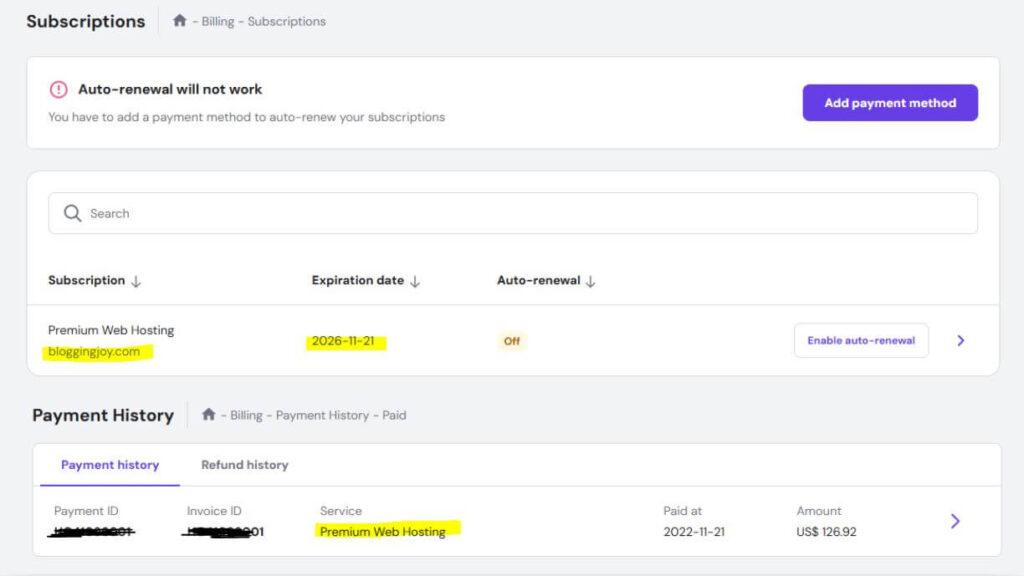
This website is proudly hosted on Hostinger’s Premium Web Hosting Plan.
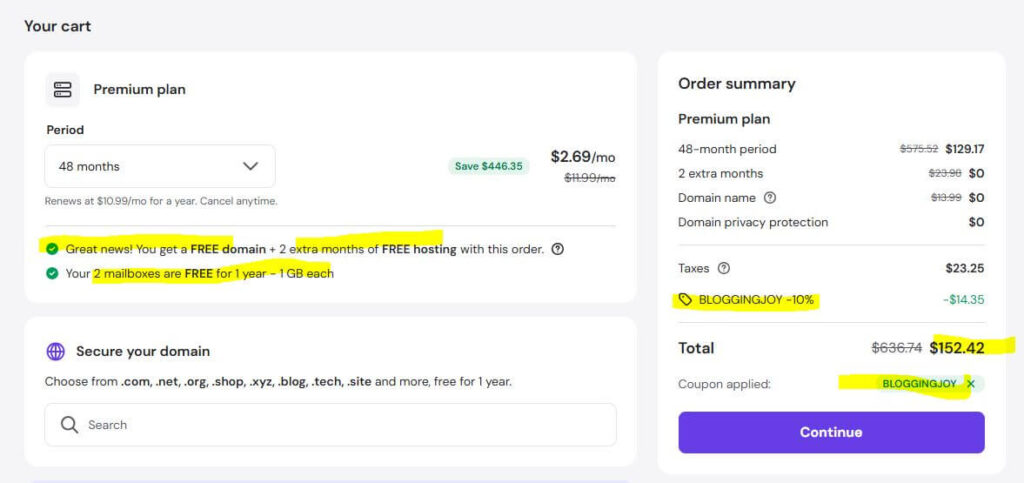
After testing multiple hosting providers over the years, I chose Hostinger for its speed, uptime reliability, and unbeatable pricing. The Premium Plan offers everything needed for a fast, secure, and scalable WordPress site — including free domain, free SSL, and LiteSpeed servers that improve loading times significantly. Here is the proof of my purchase details, expiration date and everything that you must know.
And the best part? You can use the exclusive coupon code BLOGGINGJOY to get an extra discount on top of their already affordable plans. If you’re planning to get AdSense approval or want better RPMs, moving to Hostinger is a smart long-term investment.
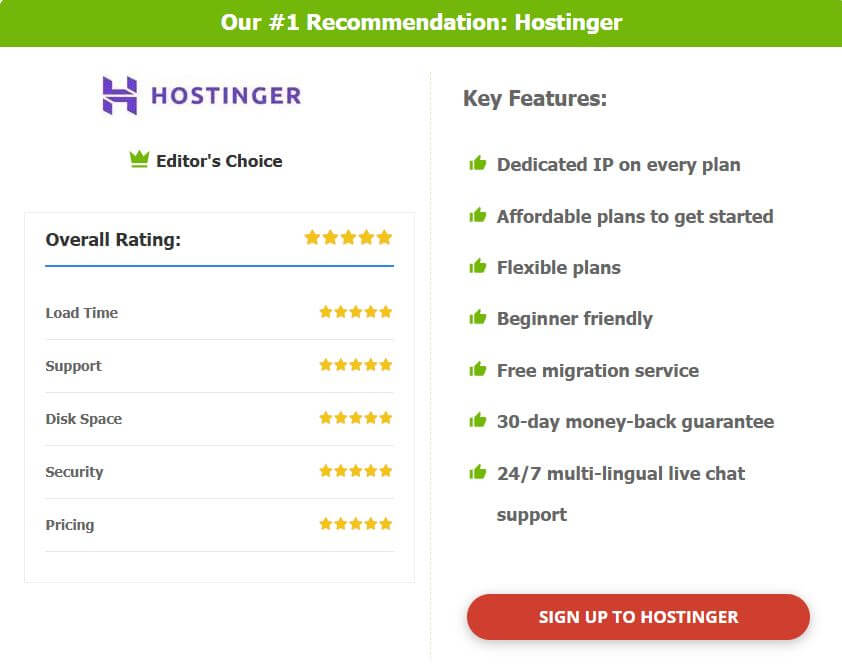
🔥 Get Up to 85% OFF on Hostinger Hosting – Limited Time Deal!
Launch your website with blazing-fast hosting at just a fraction of the price. Use Coupon Code: BLOGGINGJOY at checkout for extra savings.
✅ Free Domain | ✅ Free SSL | ✅ 24/7 Support | ✅ WordPress Optimized
👉 Click Here to Grab Hostinger’s 85% Discount Now – Don’t Miss Out!
Why AI Website Builder Hosting Is a Must-Have in 2026
Building a website in 2026 no longer has to mean installing WordPress, finding a theme, configuring plugins, designing every page manually, and then spending hours writing content.
An AI website builder combined with web hosting can simplify almost the entire process.
And this is one of the main reasons I recommend Hostinger for beginners and small businesses. You get hosting and AI-powered website-building tools inside the same ecosystem rather than using several separate platforms.
1. Launch Your Website Much Faster With AI
The biggest advantage of an AI website builder is speed.
Instead of starting with a blank page, you can describe the type of website you want and let AI create the first version for you.
For example:
“Create a professional website for an SEO consultant offering technical SEO, content strategy and local SEO services.”
The AI can generate the basic layout, sections, text and design, which you can then customize.
How Hostinger Helps
Hostinger’s AI Website Builder is designed around this exact workflow.
You describe your website or business idea, and the builder can generate the initial website for you. This is particularly useful if you are a beginner and don’t want to spend days learning WordPress or a complicated page builder before launching.
You can start with AI, customize the design and publish the website using the same Hostinger account.
👉 Want to launch a website faster? Check the latest Hostinger AI Website Builder plans and current discount.
2. You Don’t Need Coding or Web Design Experience
A few years ago, building a professional-looking website usually required some knowledge of WordPress themes, CSS, page builders or web design.
AI website builders are making this much easier.
Instead of learning how every design setting works, you can focus on telling the platform what you want your website to look like.
How Hostinger Helps
Hostinger is particularly beginner-friendly because you don’t need coding knowledge to create a website with its AI Builder.
You can generate the initial website, edit the text, change images, move sections and customize the design using visual tools.
For somebody launching their first business website, portfolio or personal brand, this can remove a huge technical barrier.
And if you later decide to use WordPress instead, Hostinger also provides WordPress hosting within the same broader hosting ecosystem.
👉 If you want to build your first website without coding, check Hostinger’s latest hosting and AI Builder offer.
3. AI Can Help Create Your Website Content
Designing the website is only half the work.
You also need headlines, service descriptions, calls to action, images, SEO text and other content before the website is ready to publish.
AI can now help with much of this initial content creation.
How Hostinger Helps
Hostinger includes AI-powered tools that can help generate website text and other content while you build.
That means a small business owner doesn’t necessarily need to hire a copywriter just to create the first version of a simple website.
You can use AI to create the initial content, then edit it to make sure it accurately represents your business, experience and brand.
This can be especially useful for:
- Homepage copy
- Service descriptions
- About sections
- Calls to action
- Basic SEO content
- Website images
👉 Want hosting and AI content tools in one place? Check the latest Hostinger plans and available discount.
4. Hosting, Domain and Website Builder Stay Together
This is probably one of the biggest advantages of choosing hosting with an AI website builder instead of using a separate AI website-generation service.
With separate tools, you may need to build the website on one platform, buy hosting somewhere else, connect the domain and then figure out how everything works together.
How Hostinger Helps
With Hostinger, the process can be much simpler:
Choose your hosting plan → Build the website with AI → Customize it → Connect your domain → Publish
Depending on the plan you choose, you may also get features such as a free domain for the first year, SSL, email, website hosting and other website-management tools inside the same account.
For beginners, having everything under one dashboard can save a lot of unnecessary setup time.
This is also one of the reasons I personally prefer using Hostinger rather than combining several separate services.
👉 Check Hostinger’s latest plan if you want hosting, domain and AI website building managed from one place.
5. AI Website Builders Can Save Money
Building a website traditionally may involve paying separately for hosting, a premium theme, a page builder, design services and sometimes even copywriting.
An AI website builder can reduce the number of separate tools you need, especially when you’re launching a simple website.
How Hostinger Helps
Hostinger combines several of these functions into its hosting ecosystem.
Instead of paying separately for hosting and then buying another standalone AI website builder, you can choose an eligible Hostinger plan that already includes website-building tools.
For a beginner, freelancer or small business, that can make the total cost of launching a website much easier to manage.
It doesn’t mean you will never need premium tools later, but you can start without buying five different subscriptions on day one.
👉 Check the latest Hostinger price and available discount before choosing a separate website builder and hosting plan.
6. AI Is No Longer Limited to Simple Website Templates
Early website builders mostly helped you select a template and replace the text and images.
AI website-building tools are becoming much more capable.
They can increasingly understand prompts, generate layouts, create content and help users build more customized websites without manually designing everything from scratch.
How Hostinger Helps
Hostinger is investing heavily in this direction.
Its AI website-building ecosystem is designed to let users create websites from natural-language instructions rather than relying only on prebuilt templates.
This makes Hostinger particularly interesting in 2026 because you are not simply buying cheap hosting — you are getting access to a hosting platform that is also evolving with AI-powered website creation.
For someone starting a new website today, I would rather choose a hosting company investing in these tools than one that still provides only traditional hosting.
👉 Want to try AI-powered website building? Check Hostinger’s latest AI Website Builder offer.
7. You Can Still Customize the Website After AI Builds It
Using AI doesn’t mean you have to accept whatever the AI generates.
The best approach is to treat AI as your starting point.
Let AI create the first version quickly, then customize the content, branding, images and sections to make the website genuinely yours.
How Hostinger Helps
With Hostinger, you can generate your website with AI and then continue editing it using the website builder.
This gives beginners the speed of AI without completely giving up control over the final website.
My recommendation would be:
Use AI to create 70–80% of the initial structure, then manually improve the remaining 20–30%.
Add your own experience, photographs, business information, testimonials and unique content before publishing.
👉 Start with Hostinger AI Website Builder and customize the website around your own brand.
7 Best Hosting Providers With AI Website Builders in 2026
AI website builders are quickly becoming one of the most useful features to look for when choosing web hosting in 2026. The difference is that you are no longer buying only server space. The better hosting platforms now help you plan, build, edit, optimize and publish a website using AI.
For this comparison, I am focusing on hosting companies where the AI website builder is actually part of the wider hosting ecosystem rather than being just a standalone design tool.
My first choice is Hostinger, mainly because I already use Hostinger myself and have practical experience with the platform. But Bluehost and GoDaddy have also made major improvements to their AI website-building capabilities, so they deserve a closer look.
1. Hostinger – Best Overall Hosting With AI Website Builder
Hostinger is my top choice for hosting with an AI website builder in 2026, especially for beginners, bloggers, freelancers and small businesses.
What makes Hostinger interesting is that its AI Builder is no longer limited to generating a few basic website sections. You can describe what you want to build, and Hostinger can generate a website or even a web application from the prompt. After that, you can continue refining the project using AI or the traditional drag-and-drop editor.
I personally use Hostinger, and one of the things I like most is that you don’t have to combine several separate services just to get a basic website online. Hosting, domain management, email, website building and many of the AI tools are available within the same ecosystem.
Hostinger AI Website Builder Capabilities
- Generate a website from a natural-language prompt
- Build websites as well as interactive web apps
- AI-assisted text and image editing
- Drag-and-drop editing after AI generation
- Create websites from an existing URL
- Built-in ecommerce functionality
- Booking functionality
- Membership and subscription capabilities
- Blog creation
- AI-powered SEO features
- AI search visibility tools
- Integrated analytics and marketing tools
- AI agents available with eligible plans
- Hosting included with eligible AI Builder plans
- Free domain for the first year on eligible plans
- Email included with selected plans
Hostinger’s current AI Builder works with eligible web hosting, cloud hosting and agency hosting plans. VPS hosting is separate and is not currently compatible with the AI Builder.
Hostinger AI Builder Pricing
Hostinger currently offers multiple AI Builder plans. In India, the entry-level Premium plan starts from around ₹149/month on a long-term promotional plan, while higher plans add more websites, AI credits and ecommerce/AI capabilities. Pricing changes regularly, so I would always check the latest offer before purchasing.
Who Should Choose Hostinger?
I would particularly recommend Hostinger for:
- Beginners creating their first website
- Bloggers
- Freelancers
- Portfolio websites
- Small business websites
- Local businesses
- Simple ecommerce websites
- Users who don’t want to learn coding
- People experimenting with AI-generated websites and web apps
For someone starting from scratch, Hostinger gives you a very straightforward path:
Describe your website → let AI build it → customize it → connect your domain → publish.
That is why Hostinger remains my #1 pick for AI-powered web hosting in 2026.
👉 Check the latest Hostinger AI Website Builder price and available discount before you buy.
2. Bluehost – Best AI Hosting for WordPress Users
Bluehost has changed significantly in 2026 and is no longer relying only on traditional WordPress hosting.
Its new Bluehost AI Website Builder can turn a prompt into a complete website and then help take that website through domain registration, hosting setup and publishing. Bluehost says its AI can also ask up to five follow-up questions about your business before generating the website, which should help produce something more relevant than a generic template.
This makes Bluehost particularly interesting for people who want AI convenience while still staying closely connected to the WordPress ecosystem.
Bluehost AI Website Builder Capabilities
- Generate a complete website from a prompt
- AI asks follow-up questions about your business
- Generate pages, copy and images
- Edit website sections using natural-language instructions
- AI-assisted design changes
- Hosting included with paid AI Website Builder plans
- Free domain for one year on eligible plans
- Free SSL
- CDN
- Weekly backups
- Malware detection and removal
- Yoast SEO Premium included on eligible paid AI Builder plans
- 14-day free trial currently available
- WordPress ecosystem integration
One feature I particularly like is conversational editing.
Instead of manually searching for design settings, you can tell the AI something like:
“Make this section more professional and replace the image with something suitable for a consulting company.”
The builder can then make the changes for you.
Bluehost Is Going Beyond AI Website Building
Bluehost is also building a much broader AI ecosystem.
It currently promotes tools including an AI Website Builder, AI Store, AI Front Desk Agent and even Agent Hosting for users who want to run AI agents, automation workflows, Python or Node.js applications.
So Bluehost is clearly moving beyond its traditional image as simply a beginner WordPress host.
Who Should Choose Bluehost?
Bluehost makes the most sense for:
- WordPress beginners
- Small business websites
- Users who want AI plus WordPress
- People who value a guided website-building experience
- Users who want domain, hosting and website creation under one provider
Hostinger would still be my first choice if affordability and simplicity are the priorities, but Bluehost is becoming a strong alternative for users who want AI website building tied closely to WordPress.
👉 Check the latest Bluehost AI Website Builder pricing and compare it with Hostinger before choosing your plan.
3. GoDaddy – Best AI Builder for Websites and Web Apps
GoDaddy has also moved well beyond its traditional domain-registration business.
Its Airo AI Builder can now create websites, online stores and even more advanced web applications from natural-language prompts.
You can describe your idea, and Airo can generate pages, starter content, images, databases and application logic without requiring you to write code.
This makes GoDaddy one of the more interesting options if you want AI to do more than simply generate a conventional business website.
GoDaddy Airo AI Builder Capabilities
- Build websites from conversational prompts
- Create web applications
- Generate online stores
- Generate pages and website sections
- AI-generated starter copy and images
- Built-in database capabilities
- Backend logic generation
- Forms included
- Analytics included
- SSL included
- GoDaddy hosting integration
- Custom domain support
- Payment integrations
- API integrations
- Code viewing and manual code editing
- Code export
- Mobile-responsive web applications
- AI-powered editing through prompts
GoDaddy describes Airo AI Builder as a full-stack AI builder, meaning it can generate more than a visual front end. It can also handle database and backend functionality for certain types of projects.
GoDaddy Airo Can Be Useful Beyond Simple Websites
For example, you could potentially prompt Airo to create:
- A small business website
- Portfolio
- Online store
- Business directory
- Reservation system
- Dashboard
- Simple customer-facing web application
GoDaddy also includes hosting and deployment with its Airo AI Builder plans, so you can publish directly instead of exporting the project and finding separate hosting.
Who Should Choose GoDaddy?
GoDaddy is particularly interesting for:
- Small business owners
- Entrepreneurs
- Freelancers
- People who already manage domains with GoDaddy
- Users experimenting with vibe coding
- Businesses needing simple custom web applications
- Users who want AI to generate both front-end and backend functionality
GoDaddy currently lets users start Airo AI Builder for free with limited AI credits, which also makes it relatively easy to test before committing to a paid plan.
Hostinger vs GoDaddy AI Builder
If your main objective is to launch a normal business website, blog, portfolio or small ecommerce site at an affordable price, I would still choose Hostinger first.
If you are particularly interested in experimenting with AI-generated applications, databases and backend functionality, GoDaddy Airo becomes much more interesting.
👉 Check GoDaddy Airo AI Builder if you want to experiment with AI-generated websites and web applications.
4. IONOS – Best Budget AI Website Builder Hosting
IONOS is a good option if your priority is keeping the initial website-building cost low while still getting access to useful AI tools.
Its AI Website Builder can create the initial site structure, text, images, and design based on a few details about your business. You can then customize the generated website using the regular editor. IONOS also includes AI tools for color palettes, text, images, logos, and SEO on eligible plans.
IONOS AI Website Builder Capabilities
- AI-generated website design
- AI-generated text
- AI-generated images
- AI Color Palette Generator
- AI Logo Generator
- AI-assisted SEO tools
- Responsive website design
- Online booking tools on higher plans
- SiteAnalytics
- Free domain for the first year
- Professional email included
- Hosting included
- 30-day money-back guarantee
One of the biggest attractions is pricing. IONOS currently promotes its Plus plan at $1/month for the first year in the U.S., before renewal at a higher regular price. That makes it one of the cheapest ways to experiment with a hosted AI website builder.
Who Should Choose IONOS?
IONOS makes the most sense for:
- Beginners on a tight budget
- Local businesses
- Freelancers
- Portfolio websites
- Simple business websites
- Users who mainly need AI-generated design and content
Compared with Hostinger, IONOS is attractive on introductory price, but I would still prefer Hostinger if you want a broader AI website-building ecosystem and more room to grow.
👉 Check the latest IONOS AI Website Builder offer and compare the renewal price before purchasing.
5. DreamHost – Best AI Builder for Websites and Full-Stack Apps
DreamHost has become much more interesting in 2026 because its Remixer product has evolved from an AI website builder into an AI website and full-stack application builder.
You describe what you want in normal language, and Remixer can create the pages, layout, copy, graphics, backend, database, and user authentication without requiring you to write code.
That means DreamHost is no longer competing only with traditional website builders. It is moving into the same broader AI app-building space as newer vibe-coding platforms.
DreamHost Remixer AI Capabilities
- Build complete websites from plain-language prompts
- Build full-stack web applications
- Generate frontend and backend
- Built-in cloud database
- User authentication
- Forms
- Payments
- File storage
- Server-side actions
- Booking systems
- Membership websites
- Customer portals
- Internal business tools
- AI conversational editing
- Hosting included
- Global CDN included
- SSL included
- Custom domain support
- 30-day free trial with no credit card
DreamHost has also added the ability to build from uploaded PDF, CSV, Markdown, and text files. So, for example, a restaurant can upload its menu or an agency can upload a services document and ask Remixer to turn that information into a website.
DreamHost Remixer Pricing
DreamHost currently lists Remixer Build at $9.99/month on promotional pricing, including 1,000 monthly credits, hosting, CDN, SSL, and custom-domain support.
Who Should Choose DreamHost?
DreamHost is particularly interesting for:
- Small businesses
- Entrepreneurs
- Membership websites
- Booking platforms
- Customer portals
- Internal tools
- People experimenting with AI-generated web apps
- Users who want a longer free trial before paying
If you only need a simple business or blog website, I would still put Hostinger ahead for overall beginner value.
But if you want AI to build something more functional, such as a booking app or member portal, DreamHost Remixer becomes a much more serious competitor.
👉 Try DreamHost Remixer if you want AI to build more than a basic website.
6. SiteGround – Best AI Hosting for Production-Ready Websites and Apps
SiteGround has taken a slightly different direction with Coderick AI.
Rather than positioning Coderick as only an AI page generator, SiteGround built it as a platform for creating production-ready websites and web applications through conversational prompts.
You describe what you want, and Coderick can generate the frontend, backend, database, authentication, and other functionality. When you’re ready, you can publish directly to SiteGround’s infrastructure without setting up separate hosting or deployment.
SiteGround Coderick AI Capabilities
- Build websites by chatting with AI
- Build functional web applications
- Auto-generated backend
- Built-in database
- User authentication
- Responsive design
- Version control
- Staging
- Stripe integration
- One-time and recurring payments
- Booking applications
- Membership areas
- CRM systems
- Dashboards and internal tools
- Custom domains
- Professional email
- Hosting included with paid plans
- Advanced security
- Code access and export capabilities
Another useful feature is that Coderick can rebuild an existing website from its URL. It can copy the layout, images, text, fonts, and color scheme of up to five pages into a new editable AI project, provided you have the rights to that content.
SiteGround Coderick AI Hosting
This is where SiteGround has a strong advantage.
Every paid Coderick plan includes hosting directly within the product, along with custom-domain support, security, database functionality, and deployment. You don’t need to build the site first and then search for a separate host.
SiteGround currently offers a 14-day free trial of the Essential plan.
Who Should Choose SiteGround?
Coderick AI is particularly suitable for:
- Businesses
- Agencies
- Developers
- Internal business tools
- SaaS prototypes
- Booking systems
- Membership websites
- Dashboards
- Ecommerce projects
- Users who want AI building plus serious hosting infrastructure
Compared with Hostinger, I would say Hostinger is easier to recommend to the average beginner, while SiteGround Coderick becomes particularly interesting for users who want to create more advanced apps and deploy them directly onto established hosting infrastructure.
👉 Check SiteGround Coderick AI if you want AI website and app building backed by SiteGround hosting.
7. HostGator – Best Simple AI Website Builder for Beginners
HostGator has also introduced an agentic AI Website Builder designed to make website creation much more conversational.
You start by describing the website you want. The AI then improves the prompt, asks questions about your business and goals, and generates the initial website. You can continue editing the copy, images, colors, and design simply by describing the changes you want.
The biggest appeal here is simplicity.
HostGator is not asking beginners to understand WordPress, templates, themes, or code before getting started.
HostGator AI Website Builder Capabilities
- Generate an entire website from a prompt
- AI improves your initial website brief
- Follow-up questions about your business
- AI-generated website structure
- AI-generated copy and images
- Conversational website editing
- Change design by asking AI
- Custom domain support
- Hosting included
- SSL included
- Security features
- Backups
- SEO functionality
- One-click publishing
- 3-day free trial currently offered
HostGator’s page emphasizes a workflow of:
Describe → Customize → Launch
which makes it well suited to users who want AI to handle most of the initial setup.
Who Should Choose HostGator?
HostGator is most suitable for:
- First-time website owners
- Small businesses
- Freelancers
- Portfolio websites
- Simple service websites
- Users who want conversational AI editing
- Existing HostGator customers
For a straightforward AI-generated website, HostGator can certainly do the job.
However, if I were choosing specifically for AI website hosting in 2026, I would still put Hostinger ahead because of the combination of pricing, hosting, AI tools, WordPress options, and the broader ecosystem available from the same account.
👉 Check HostGator AI Website Builder if you want a simple prompt-to-website experience with hosting included.
Final Verdict: Which Is the Best Hosting With AI Website Builder in 2026?
AI website builders are no longer just an extra feature. In 2026, they are becoming an important part of modern web hosting because they can help you launch websites faster, reduce technical work, create content, generate designs, and manage everything from one platform.
All seven hosting providers covered in this article now offer useful AI website-building capabilities, but they are not equally suitable for every user.
If you are a beginner, blogger, freelancer, or small business owner, Hostinger is my top recommendation. I already use Hostinger myself, and I like the way it combines hosting, domain management, email, WordPress tools, and AI website building within the same ecosystem.
For users who specifically want AI combined with WordPress, Bluehost is worth considering.
If your goal is to experiment with AI-generated websites and web applications, GoDaddy, DreamHost, and SiteGround have become much more interesting in 2026.
IONOS is a strong option for budget-conscious users, while HostGator keeps the AI website-building process simple for beginners.
My final recommendation is straightforward:
Choose Hostinger if you want the best balance of affordability, ease of use, AI website-building features, and traditional web hosting in one place.
And if you are starting a new website, I would recommend using AI to create the first version quickly and then manually improving the content, branding, images, and important pages before publishing.
👉 Check the latest Hostinger AI Website Builder price and available discount before you buy.
If Hostinger fits your needs, it is currently the hosting provider I would choose first for an AI-powered website in 2026.
Frequently Asked Questions
What is an AI website builder?
An AI website builder uses artificial intelligence to help create a website from simple instructions or prompts. Depending on the platform, AI can generate the website structure, pages, text, images, layouts, and even some interactive functionality. You can then customize the generated website before publishing it.
What is AI web hosting?
AI web hosting generally refers to hosting platforms that integrate AI-powered tools for website creation, content generation, SEO, design, management, or optimization. Providers such as Hostinger now combine traditional hosting with AI website-building features in the same ecosystem.
Which is the best hosting with an AI website builder in 2026?
For most beginners, bloggers, freelancers, and small businesses, Hostinger is my top pick for hosting with an AI website builder in 2026. It combines affordable hosting, AI website creation, domain management, email, WordPress tools, and other website features under one platform.
Is Hostinger AI Website Builder good for beginners?
Yes. Hostinger AI Website Builder is particularly suitable for beginners because you can describe the type of website you want and let AI generate the initial design and content. You can then customize the website without needing to know coding.
Does Hostinger include hosting with its AI Website Builder?
Yes. Eligible Hostinger AI Website Builder plans include web hosting, so you do not need to purchase a separate hosting account just to publish the website. Depending on the plan, you may also receive a free domain for the first year and other website tools.
Can Hostinger AI build a complete website?
Hostinger AI can generate the initial website structure, design, text, images, and pages based on your instructions. You can then use the editor and AI tools to customize the website before publishing it.
Can I build a website without coding using Hostinger?
Yes. You do not need coding knowledge to use Hostinger AI Website Builder. The platform is designed around AI generation and visual editing, allowing beginners to create and customize websites without manually writing HTML, CSS, or JavaScript.
Can AI website builders create ecommerce websites?
Yes. Several modern AI website builders support ecommerce functionality. Hostinger, GoDaddy, and other providers can help create online stores, product pages, payment-related functionality, and other ecommerce features depending on the selected plan.
Can an AI website builder create a web app?
Some newer AI website builders are moving beyond basic websites. Platforms such as Hostinger, GoDaddy Airo, DreamHost Remixer, and SiteGround Coderick can support more advanced website or web-app creation capabilities, although features vary significantly by provider.
Is Hostinger better than Bluehost for AI website building?
For most beginners, I prefer Hostinger because of its combination of affordable pricing, AI website-building tools, traditional hosting, and ease of use. Bluehost is also worth considering if you specifically want AI website-building features combined closely with the WordPress ecosystem.
Is Hostinger better than GoDaddy AI Website Builder?
Hostinger is my preferred option for beginners who want affordable hosting and AI website creation in one place. GoDaddy Airo becomes more interesting if you want to experiment with more advanced AI-generated applications and backend functionality.
Which AI website builder hosting is cheapest?
Pricing changes frequently, but Hostinger and IONOS are generally among the more affordable options in this comparison. Always compare the actual checkout price, subscription length, renewal cost, and included features rather than looking only at the advertised monthly price.
Can I use my own domain with an AI website builder?
Yes. Most paid AI website builder hosting plans allow you to connect your own custom domain. Some providers, including Hostinger, may also include a free domain for the first year with eligible long-term plans.
Is WordPress better than an AI website builder?
It depends on your requirements. WordPress provides more flexibility, plugins, themes, and long-term control, while an AI website builder can be much faster and easier for beginners. For a simple business website, portfolio, or landing page, an AI builder may be enough. For a complex content or ecommerce website, WordPress may offer more flexibility.
Can I use Hostinger for WordPress and AI website building?
Yes. Hostinger offers both WordPress hosting and its AI Website Builder ecosystem. This means you can choose the approach that best suits your project rather than being limited to only one type of website-building platform.
Are AI website builders good for SEO?
AI website builders can help with basic SEO tasks such as generating titles, descriptions, website copy, and structured pages. However, ranking on Google still depends on factors such as content quality, search intent, website authority, backlinks, technical SEO, user experience, and competition. AI alone does not guarantee rankings.
Will an AI website builder replace web developers?
Not completely. AI website builders can handle many simple websites and speed up development, but complex websites, custom applications, integrations, performance optimization, and advanced functionality may still require developers. AI is better viewed as a productivity tool rather than a complete replacement for professional development.
Is it safe to build a business website with AI?
Yes, provided you use a reliable platform and review everything AI generates before publishing. Check the website content, contact details, legal pages, product information, images, forms, payment settings, and security configuration manually.
Do I own the website created with an AI website builder?
Ownership and portability depend on the provider’s terms. Some builders allow you to export code or move parts of the website, while others keep the site closely tied to their platform. If portability is important to you, check the provider’s export and migration options before choosing a plan.
Should I choose hosting with an AI website builder in 2026?
If you are creating a new website, I would strongly consider it. Even if you do not let AI build the entire website, AI tools can save time with initial design, content creation, images, SEO, and website setup. For beginners especially, a hosting platform such as Hostinger that combines hosting and AI website creation can make the entire process much easier.